
Download Microsoft Keyboard Layout Creator – keyboard layout, custom keyboard, keyboard remapping, keyboard customization, keyboard tool, keyboard utility, keyboard shortcut, keyboard layout creator, keyboard tool for Windows
Overview
Microsoft Keyboard Layout Creator (MSKLC) is a specialized utility designed for users seeking complete control over their keyboard input experience on Windows systems. Developed by Microsoft, this tool enables individuals and professionals to create, modify, and deploy custom keyboard layouts tailored to specific linguistic, technical, or workflow needs. It serves as a critical resource for users working with non-standard scripts, rare typographic symbols, or specialized coding environments where default layouts fall short. The application is particularly valuable for multilingual users, language researchers, developers, and accessibility advocates who require precise keyboard behavior beyond standard configurations.
MSKLC addresses the core limitation of fixed keyboard mappings by allowing users to redefine key outputs, assign multiple characters per key, and save layouts for future use. This functionality supports real-world scenarios such as adapting layouts for regional dialects, streamlining repetitive symbol entry in technical writing, or optimizing shortcuts for frequent commands. The tool operates exclusively on Windows platforms, making it a focused yet powerful addition to the productivity suite available for desktop users. Although the developer did not provide additional technical details about the target user base beyond general use cases, its design suggests strong utility for advanced users and IT professionals.
Within the broader ecosystem of Windows utilities, MSKLC fills a niche gap by offering a free, official solution for keyboard customization. It stands out among third-party alternatives due to its integration with Microsoft’s development stack and long-standing support across multiple Windows versions. Its continued availability in version 1.4 underscores Microsoft’s commitment to supporting user-driven customization, even in an era dominated by touch-centric interfaces.
Key Features & Functionality
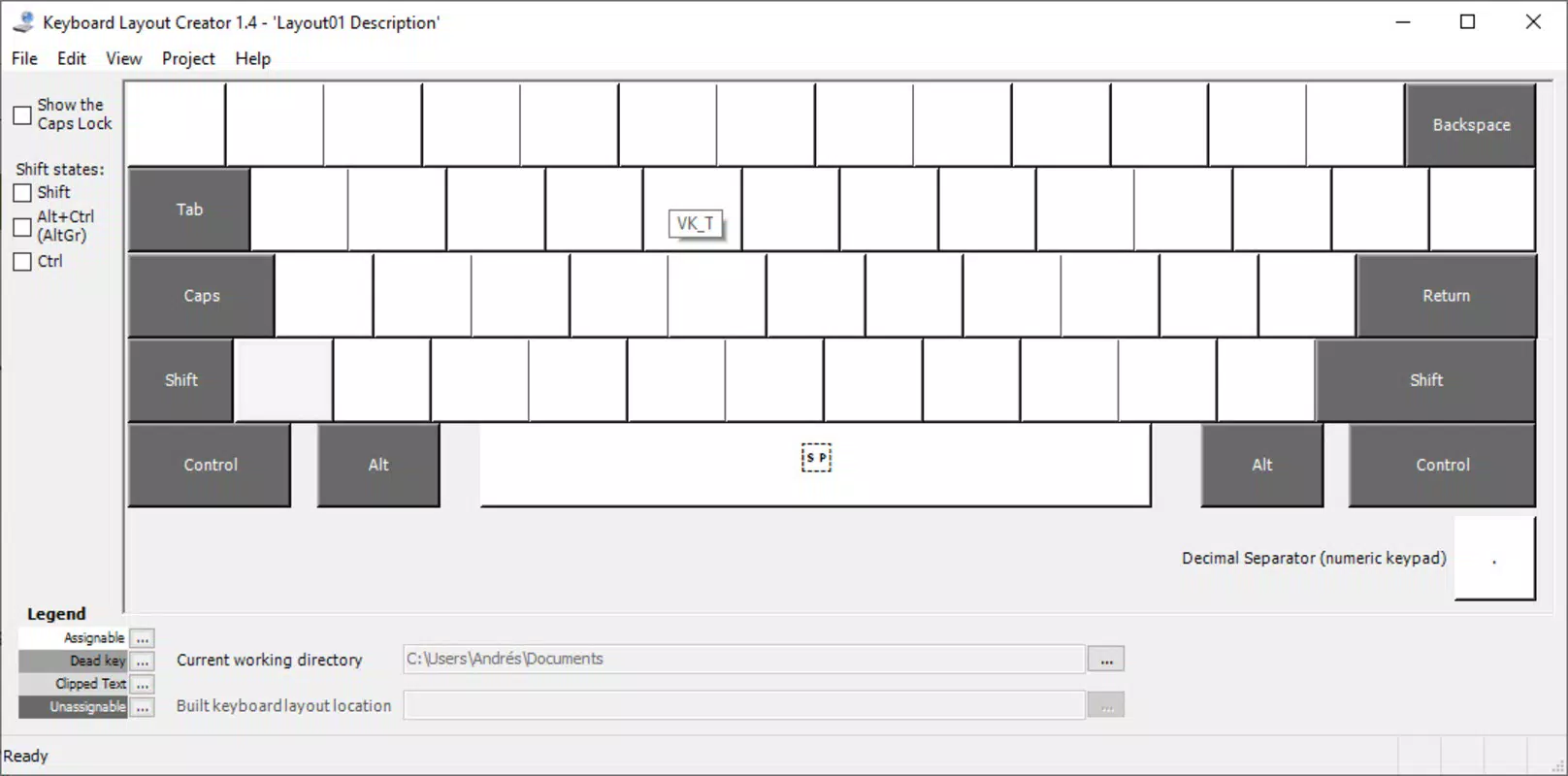
- Easy Key Remapping: Users can interactively redefine any key by pressing it on the on-screen keyboard. This real-time feedback simplifies the process, allowing immediate visualization of changes without requiring deep technical knowledge.
- Multi-Character Assignment: Each key can be assigned up to four distinct characters, enabling complex symbol combinations and alternate input methods for specialized workflows.
- Save and Load Custom Layouts: Created layouts are stored in .KLC format, allowing users to preserve, share, and reuse configurations across different systems or sessions.
- Modifier Key Customization: While traditional modifier keys (CTRL, SHIFT, ALT) remain unchanged, users can customize the space bar and assign characters to modified key combinations, enhancing flexibility in input design.
- Compatibility with Multiple Windows Versions: The tool supports Windows 10, XP, 2000, and Server 2003, ensuring broad usability across legacy and modern systems.
These features serve practical use cases such as creating keyboard layouts for academic research involving rare scripts, designing efficient shortcuts for developers, or enabling accessibility for users with specific motor or cognitive needs. For example, a linguist might use MSKLC to generate a layout for a lesser-known African language, while a programmer could assign frequently used brackets or symbols to more accessible keys.
Real-World Use Cases
One common application is in academic and technical writing, where users need to input complex Unicode characters without relying on cumbersome copy-paste methods. Another example is in software development, where custom key mappings can reduce keystrokes during coding sessions. The ability to save layouts also facilitates team collaboration, allowing shared configurations across workstations.
Interface, UX & Performance
Microsoft Keyboard Layout Creator presents a clean, minimal interface centered around an on-screen keyboard display. The layout is structured to prioritize clarity and direct interaction, with key mapping actions initiated through simple mouse clicks or physical key presses. Navigation is linear and intuitive, guiding users through the process of editing, testing, and saving layouts with minimal friction.
Visual design follows a standard Windows desktop aesthetic, using consistent color schemes and typography to ensure readability. The on-screen keyboard updates in real time as changes are made, providing immediate feedback that enhances user confidence during customization. Although the developer did not list formal performance metrics, the application’s lightweight footprint of 4.7 MB suggests efficient resource usage, likely contributing to smooth operation across a range of Windows devices.
Responsiveness appears to be consistent, with no reported lag during key remapping or layout testing. Stability is supported by its long-standing presence in the Microsoft ecosystem, indicating reliable behavior under typical usage conditions. However, specific requirements for performance on older hardware or low-memory systems were not disclosed.
Platform Compatibility & Technical Requirements
Microsoft Keyboard Layout Creator is designed exclusively for the Windows operating system. It is compatible with Windows 10, Windows XP, Windows 2000, and Windows Server 2003. The application requires Microsoft .NET Framework v1.0 or v1.1 to run properly, which may necessitate additional setup on some systems.
The file size is 4.7 MB, indicating a lightweight installation that does not burden system storage. The software is distributed as a free tool, with no cost associated with download or use. Specific requirements for RAM, processor speed, or disk space were not listed by the developer.
The developer did not specify minimum OS requirements beyond the listed versions. Compatibility with newer Windows releases such as Windows 11 was not confirmed, and no information was provided about support for non-Windows platforms. Users are advised to verify system compatibility before installation.
Pros and Cons
- Free to download and use
- Official Microsoft tool with trusted reliability
- Supports creation of complex, multi-character key mappings
- Enables layout sharing and reuse across systems
- Lightweight file size (4.7 MB)
- Intuitive interface for interactive remapping
- Only available for Windows platforms
- Requires .NET Framework for operation
- Does not support remapping of core modifier keys (CTRL, SHIFT, ALT)
- Unsupported on older Windows versions like 95 and 98
- Limited documentation on performance across hardware tiers
FAQ
Is Microsoft Keyboard Layout Creator free to use?
Yes, the tool is available at no cost. It is distributed by Microsoft as a free utility for customizing keyboard layouts on Windows systems.
Can I use MSKLC on Windows 11?
While the tool is confirmed to work on Windows 10, XP, 2000, and Server 2003, official support for Windows 11 was not specified by the developer.
Do I need to install .NET Framework to run MSKLC?
Yes, the application requires Microsoft .NET Framework v1.0 or v1.1 to function properly. Installation of the framework may be necessary before using the tool.
Can I share my custom keyboard layout with others?
Yes, custom layouts can be saved in .KLC format and shared with other users who have MSKLC installed. This enables collaboration and consistent configuration across devices.
Is MSKLC safe to download and install?
As a tool developed and distributed by Microsoft, MSKLC is considered secure. It does not include third-party components or adware, and its source is officially verified.
Final Thoughts
Microsoft Keyboard Layout Creator remains a vital tool for users who demand precision and flexibility in their keyboard input. Its ability to generate custom layouts with multi-character assignments and cross-system compatibility makes it indispensable for linguists, developers, and power users. Despite its narrow platform scope and dependency on .NET Framework, its reliability, simplicity, and official backing ensure it remains a trusted choice in the productivity landscape.
For anyone working with non-standard scripts, frequent symbol entry, or specialized workflows, MSKLC delivers tangible value without cost or complexity. It is especially beneficial for professionals who rely on consistent, optimized input methods across multiple projects.
Download Microsoft Keyboard Layout Creator now


